How to configure Claude Code to achieve a good level of data privacy
Programming Estimated reading time: ~4 minutes
Claude Code is Anthropic’s AI coding agent which runs in your terminal. Besides the API requests which are necessary for the tool to work it also sends telemetry, error reports and feedback data by default. In this article you will learn how to configure Claude Code so that as little data as possible leaves your machine and your data is not used for model training.
Opt out of model training
The most important setting is not part of Claude Code at all. Whether your
conversations are used for model training is controlled by an account-level
toggle at https://claude.ai/settings/data-privacy-controls.
No environment variable or configuration file on your machine has any effect
on this — you have to check it in the browser. Make sure the option
Help improve our AI models (model training) is turned off. The details are described in
Anthropic’s privacy article.
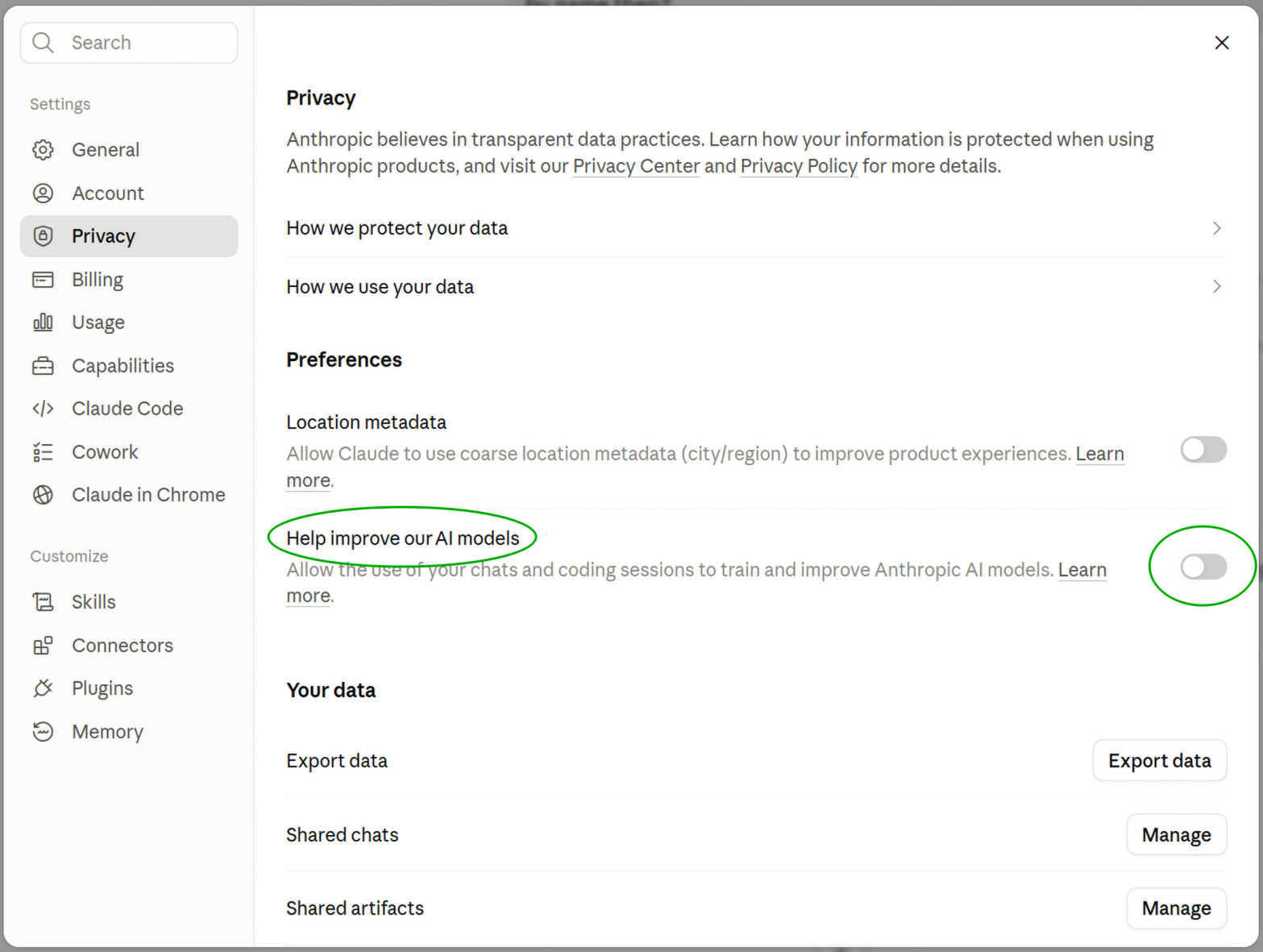
The account-level data privacy controls with model training turned off.
Disable telemetry, error reporting and feedback traffic
Claude Code reads environment variables from the env block of its
settings file. Add the following
to ~/.claude/settings.json:
{
  "env": {
    "CLAUDE_CODE_DISABLE_FEEDBACK_SURVEY": "1",
    "CLAUDE_CODE_DISABLE_NONESSENTIAL_TRAFFIC": "1",
    "DISABLE_ERROR_REPORTING": "1",
    "DISABLE_FEEDBACK_COMMAND": "1",
    "DISABLE_TELEMETRY": "1"
  },
  "feedbackSurveyRate": 0
}
What the individual settings do:
DISABLE_TELEMETRYopts out of operational telemetry (usage metrics).DISABLE_ERROR_REPORTINGopts out of automatic crash and error reporting (error messages and stack traces from Claude Code’s internals, sent to a third-party error tracking service). Since Claude Code v2.1.198 error reporting is enabled by default if you are signed in with a Pro or Max subscription and connect directly to the Claude API. Known patterns of secrets, file paths and email addresses are redacted before sending, but it is still data leaving your machine.DISABLE_FEEDBACK_COMMANDdisables the/bugcommand. This prevents you (or anyone using your machine) from accidentally submitting a bug report which includes the current conversation.CLAUDE_CODE_DISABLE_FEEDBACK_SURVEYandfeedbackSurveyRate = 0disable the occasional feedback surveys.CLAUDE_CODE_DISABLE_NONESSENTIAL_TRAFFICis an umbrella switch which disables all network traffic that is not essential for the tool to work. It covers the settings above. Setting the individual variables as well is redundant, but it documents your intent and still works if the semantics of the umbrella switch ever change.
The full list of variables is documented on the Claude Code settings page.
Additionally you can export the same variables in your ~/.bashrc:
// file ~/.bashrc
export CLAUDE_CODE_DISABLE_FEEDBACK_SURVEY=1
export CLAUDE_CODE_DISABLE_NONESSENTIAL_TRAFFIC=1
export DISABLE_ERROR_REPORTING=1
export DISABLE_FEEDBACK_COMMAND=1
export DISABLE_TELEMETRY=1
This way the variables are also set if Claude Code is started in a way which
does not read your settings.json (an old version, a different config
directory, some IDE integration, …).
What still leaves your machine
Be aware of what this configuration does not change: your prompts and the contents of the files Claude Code reads are still sent to the Anthropic API. That is the core function of the tool and cannot be disabled. What you get is that no telemetry, error reports, surveys or feedback data are sent, and — via the account toggle — that your conversations are not used for model training. Which data Anthropic collects and how long it is retained is described in the data usage documentation.
What happens if you rate a session or send feedback
Feedback is a special case. If you rate a conversation with the thumbs up/down
buttons, Anthropic stores the entire conversation for up to 5 years and may use
it for model training — even if you have opted out of model training. The
same retention period applies to transcripts sent with the /feedback, /bug
or /share commands in Claude Code, which include your conversation history
and code. The session quality survey (“How is Claude doing this session?”) is
harmless in comparison: it records only your rating, and a transcript is only
uploaded if you explicitly agree in a separate follow-up question. With the
configuration shown above the surveys are disabled and the /feedback command
is turned off, so none of this data is sent.
Verifying the configuration
You can check that the variables are actually in effect by running the following command from within a Claude Code session (or any shell):
$ for v in CLAUDE_CODE_DISABLE_FEEDBACK_SURVEY \
    CLAUDE_CODE_DISABLE_NONESSENTIAL_TRAFFIC \
    DISABLE_ERROR_REPORTING DISABLE_FEEDBACK_COMMAND DISABLE_TELEMETRY; do
  printf '%s=%s\n' "$v" "${!v}"
done
CLAUDE_CODE_DISABLE_FEEDBACK_SURVEY=1
CLAUDE_CODE_DISABLE_NONESSENTIAL_TRAFFIC=1
DISABLE_ERROR_REPORTING=1
DISABLE_FEEDBACK_COMMAND=1
DISABLE_TELEMETRY=1
Also make it a habit to re-check the data usage documentation from time to time. New Claude Code versions may introduce new settings, and the account-level training default may change.
A note about Netcup (advertisement)
Netcup is a German hosting company. Netcup offers inexpensive, yet powerfull web hosting packages, KVM-based root servers or dedicated servers for example. Using a coupon code from my Netcup coupon code web app you can even save more money (6$ on your first purchase, 30% off any KVM-based root server, ...).